AI Cost Optimization
MithraTiny BOM Cost Optimizer Agent
Electronics BOM cost optimization: alternate parts, obsolete parts and supplier consolidation.
Find savings in an electronics bill of materials: duplicates, alternates, obsolete parts and supplier consolidation.
The workflow, step by step
- 1
Upload the BOM
Drop an Excel or CSV file. The header row is found, the columns are mapped, and every line is validated before anything is analysed.
- 2
Add what you know
Optionally add your Approved Vendor List, Preferred Parts List and a component cost file, then the product type, currency and annual volume.
- 3
Analyse
The cost maths is calculated in code and each recommendation is risk-reviewed. With your own DigiKey or Mouser account connected, prices, stock and lifecycle are live.
- 4
Decide and export
Approve, reject or mark each recommendation as implemented, and the savings recalculate. Export to Excel, PDF, CSV or JSON.
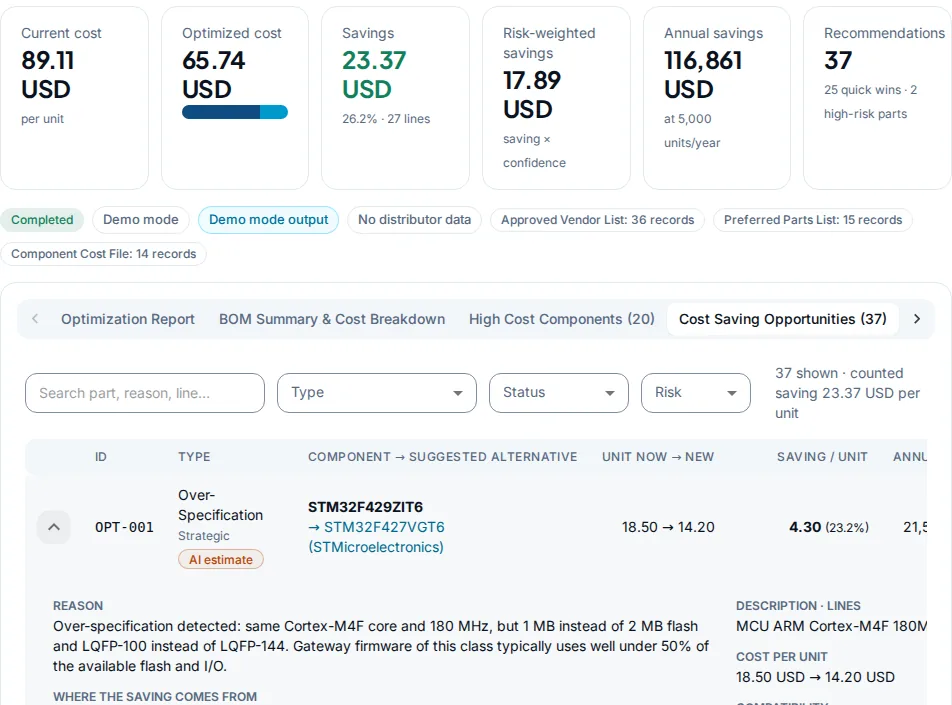
BOM analysis: what goes in and what you get
A bill of materials (BOM) cost analysis and optimization tool for electronics and hardware BOMs. It analyses the BOM you upload and recommends changes; it is not a PLM or BOM management system, so your BOM stays the master in your own tools.
What goes in
- Your BOM as an Excel or CSV file: the header row is found, columns are mapped, decimal commas and currency are detected, and every row is validated
- Optionally an Approved Vendor List, a Preferred Parts List and a component cost reference
- Product type and annual volume
What you get
- Cost breakdown by category, supplier, manufacturer and lifecycle, with a Pareto/ABC analysis
- Duplicates, obsolete parts, risk components, supplier consolidation and cheaper alternates
- For each recommendation: current and new cost, saving, reason, risk, effort, confidence, impact and the validation needed. Approve, reject or mark implemented, and the savings recalculate
- With your own DigiKey or Mouser account connected: the stock, price breaks, lead time and lifecycle of every part, a supplier comparison, long-lead and shortage risks, and savings priced from the distributors' own figures
Exports: Excel, PDF, CSV and JSON
The report includes an executive summary, the savings report and a three-phase roadmap. A saving is only counted from distributor data, your quote files or your BOM: never from an estimate of the AI when distributors are connected.
Free trial: 7 days, 1 full run a day in total across the three apps. For full access, contact sales for a Custom Pass.
What engineers use it for
- Prepare a cost-down review of a board before the next production order
- Find cheaper alternates and duplicate parts across a gateway or controller BOM
- Spot obsolete, end-of-life and single-source parts early
- Consolidate suppliers and see the saving per unit and per year at your volume
Who it is for
Electronics procurement teams
See where the cost of a BOM goes, which suppliers can be consolidated and which parts carry lifecycle or shortage risk.
Hardware engineers
Review cheaper alternates and duplicates with the risk, effort and validation of each change stated.
Electronics design engineers
Find obsolete and risky parts early, with live distributor lifecycle data once you connect your own account.
Where it helps today
Your data and your engineering judgement
- Private to your accountProjects and knowledge-base documents are visible only to you, enforced by the server and again by row-level security in the database.
- Not used to train modelsMithraTiny does not train models on your content, and Microsoft's terms for Azure OpenAI do not allow it either.
- Results you can checkEvery result shows its reasoning and its risks. Verify it against datasheets and standards before you use it.
More on the security page and in the privacy policy.
Guides and templates
Frequently asked questions
What is BOM cost optimization?+
Lowering the cost of a bill of materials without breaking the design: removing duplicate parts, replacing over-specified or obsolete parts with cheaper equivalents, consolidating suppliers and aligning prices with your quotes. The BOM Cost Optimizer starts with a BOM cost analysis (cost by category, supplier, manufacturer and lifecycle, with a Pareto/ABC analysis) and lists every opportunity with its saving, risk, effort and the validation it needs.
Which BOM files can I upload?+
An Excel or CSV file. The header row is found, the columns are mapped (you can correct the mapping), decimal commas and currencies are detected and every row is validated before the analysis.
What savings does it look for?+
Duplicates, obsolete and risk components, supplier consolidation and cheaper alternate parts. Each recommendation shows the current and new cost, the saving, the reason, the risk, the effort, the confidence and the validation needed.
How does it handle obsolete or end-of-life parts?+
Parts that are not recommended for new designs (NRND), last-time-buy, end-of-life or obsolete are listed as obsolete warnings with a suggested replacement, and the alternate parts list shows each proposed replacement with its cost, saving, risk and confidence. With your own DigiKey or Mouser account connected, the lifecycle comes from the distributors. Check every alternate part against its datasheet before you change the design.
Does it use live distributor data?+
Yes, when you connect your own DigiKey or Mouser account: stock, price breaks, lead time and lifecycle then come from the distributors' APIs. Those figures are never estimated by the AI.
Can I add our approved vendor list?+
Yes. With the BOM you can upload an Approved Vendor List, a Preferred Parts List and a component cost reference.
Which export formats are available?+
Excel, PDF, CSV and JSON. The report includes an executive summary, the savings report and a three-phase roadmap.
How large can the BOM be?+
Up to 5,000 lines and 20 MB per file. Semicolon CSVs, decimal commas and title rows above the header are handled.
Is my data used to train AI models?+
No. MithraTiny does not use your content to train models, and under Microsoft's terms for Azure OpenAI the prompts and results are not used to train its models either. Your projects stay private to your account.
Do I need to set up an AI service?+
No. The AI is included: MithraTiny runs it for all three apps, so there is no model to choose and nothing to configure.
Does it replace an engineering review?+
No. The results are a checked starting point that shows its reasoning. Verify every design, calculation and test against the official datasheets, standards and your own review before you use it.
The other MithraTiny AI apps
Compare all three on the features page, or see the passes on the pricing page.
Put an AI Engineer on your next board
Where Engineering Meets Super Intelligence. Free to start, AI included.