AI Component Selection
MithraTiny Component Selector Agent
Electronic component selection with worst-case rating and derating checks.
From board requirements to a schematic-ready main active component recommendation, with derating checks and risks.
The workflow, step by step
- 1
Describe the board
Type, paste or upload the requirements (TXT, MD, PDF, DOCX or CSV), then choose the application domain and the production volume.
- 2
Set your preferences
Add preferred manufacturers and instructions. With your own DigiKey or Mouser account connected, set preferred suppliers, a target cost, a package and certifications such as AEC-Q100.
- 3
Get checked components
The requirements, the block architecture and the power tree come first, then a main active component per block, checked against the worst case.
- 4
Answer and re-run
Answer the missing requirements it lists and run again for fewer open questions. Export to Excel, PDF, Markdown, CSV or JSON.
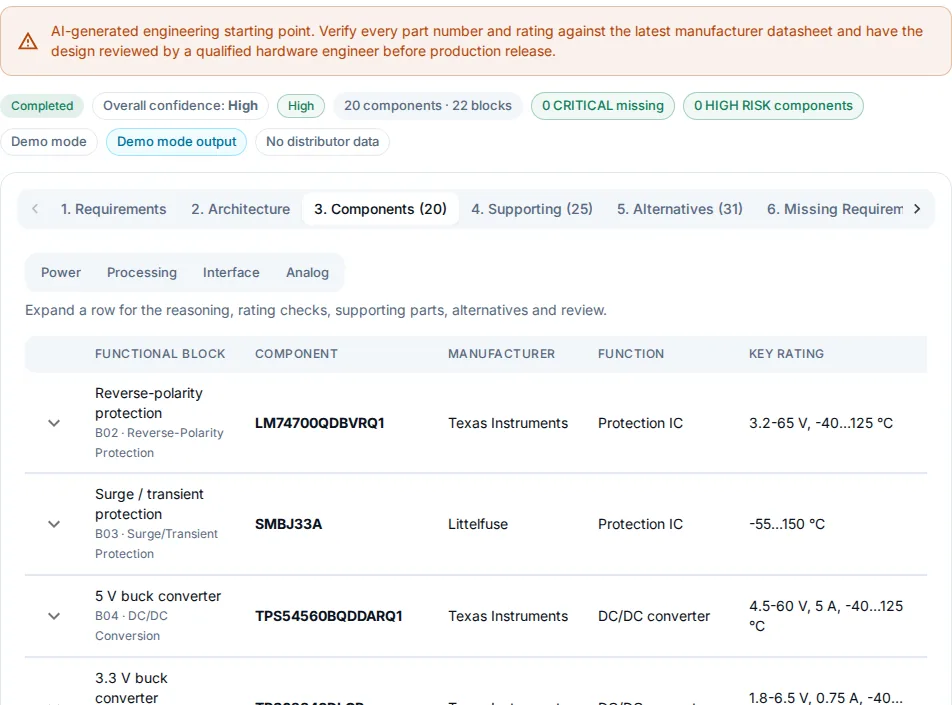
Component selection from requirements: what goes in and what you get
An AI component selection tool for electronics and hardware design: from your board requirements to recommended main active components, each with two alternatives to compare and worst-case rating and derating checks.
What goes in
- A requirement document, a specification or a plain description of the board
- Type, paste or upload TXT, MD, PDF or DOCX
- Application domain (it sets the derating policy, for example AEC-Q for automotive), production volume and preferred manufacturers
What you get
- Explicit, inferred and missing requirements, with the evidence and the worst-case electrical envelope
- The block architecture and the power budget, then a table with the exact part number, manufacturer, key rating, package, why it was selected, risks and two alternatives per block
- Missing requirements ranked CRITICAL, IMPORTANT or OPTIONAL, the design risks and a final report with a confidence for every recommendation
- With your own DigiKey or Mouser account connected: every block searched in both catalogs, the candidates checked against the worst case and ranked by technical fit, stock, cost, lifecycle and compliance, with stock, lead time and pricing side by side
Exports: Excel, PDF, Markdown, CSV and JSON
Voltage margin, current, surge, dropout and junction-temperature checks are computed, not guessed. Stock, price, lead time and lifecycle come from the distributors' APIs, never from a model.
Free trial: 7 days, 1 full run a day in total across the three apps. For full access, contact sales for a Custom Pass.
What engineers use it for
- Choose the processor, power converters, interfaces and protection of a new IoT, Edge AI or industrial board
- Check the voltage, current, dropout and junction-temperature margins of the main parts in the worst case
- Find the requirements still missing from a board specification before the schematic starts
- Compare candidates on live DigiKey and Mouser stock, price, lead time and lifecycle
Who it is for
Hardware engineers
Go from board requirements to functional blocks, a power tree and checked main active components.
Electronics design engineers
Get the exact part number, key rating, package, risks and two alternatives for each block, with the derating computed.
Embedded systems engineers
Choose the main processor and the other main active parts of an embedded, IoT or Edge AI board from its requirements.
Where it helps today
Your data and your engineering judgement
- Private to your accountProjects and knowledge-base documents are visible only to you, enforced by the server and again by row-level security in the database.
- Not used to train modelsMithraTiny does not train models on your content, and Microsoft's terms for Azure OpenAI do not allow it either.
- Results you can checkEvery result shows its reasoning and its risks. Verify it against datasheets and standards before you use it.
More on the security page and in the privacy policy.
Guides and templates
Frequently asked questions
What do I need to describe my board?+
A requirement document, a specification or a plain description of the board, typed, pasted or uploaded as TXT, MD, PDF or DOCX, with the application domain, the production volume and any preferred manufacturers.
Which components does it select?+
The main active components of the board, block by block: for example the processor, the power converters, the interfaces and the protection. For each block it gives the exact part number, the manufacturer, the key rating, the package, why it was selected, its risks and two alternatives.
How are the components checked?+
Voltage margin, current, surge, dropout and junction-temperature checks are computed against the worst-case envelope, with a derating policy set by the application domain (for example AEC-Q for automotive).
Does it use live DigiKey and Mouser data?+
Yes, once you connect your own DigiKey or Mouser account: every block is searched in both catalogs and the candidates are ranked by technical fit, stock, cost, lifecycle and compliance. Stock, price, lead time and lifecycle come from the distributors' APIs, never from a model.
Can it compare components and suggest alternatives?+
Yes. Every block gets two alternatives, and the alternatives view compares parts from other manufacturers and shows whether they are pin-compatible. With your own DigiKey or Mouser account connected, the candidates of each block are ranked by technical fit, stock, price, lifecycle and compliance, with the two distributors side by side.
Which export formats are available?+
Excel, PDF, Markdown, CSV and JSON.
What if my requirements are incomplete?+
They usually are. The missing requirements are listed and ranked CRITICAL, IMPORTANT or OPTIONAL. Type the answers you have and re-run: they are added as explicit requirements and the selection runs again.
Is my data used to train AI models?+
No. MithraTiny does not use your content to train models, and under Microsoft's terms for Azure OpenAI the prompts and results are not used to train its models either. Your projects stay private to your account.
Do I need to set up an AI service?+
No. The AI is included: MithraTiny runs it for all three apps, so there is no model to choose and nothing to configure.
Does it replace an engineering review?+
No. The results are a checked starting point that shows its reasoning. Verify every design, calculation and test against the official datasheets, standards and your own review before you use it.
The other MithraTiny AI apps
Compare all three on the features page, or see the passes on the pricing page.
Put an AI Engineer on your next board
Where Engineering Meets Super Intelligence. Free to start, AI included.